
Advanced Policy Component
The Advanced Policy Component provides fine-grained, low-level control over how applications, authentication methods, and secure services behave on managed devices.
These settings are typically used in high-security, enterprise, or custom-integration environments and map closely to advanced features of the Android Management API (AMAPI).
Use this component only when standard components (General, Network, Security, Application) do not meet your requirements.
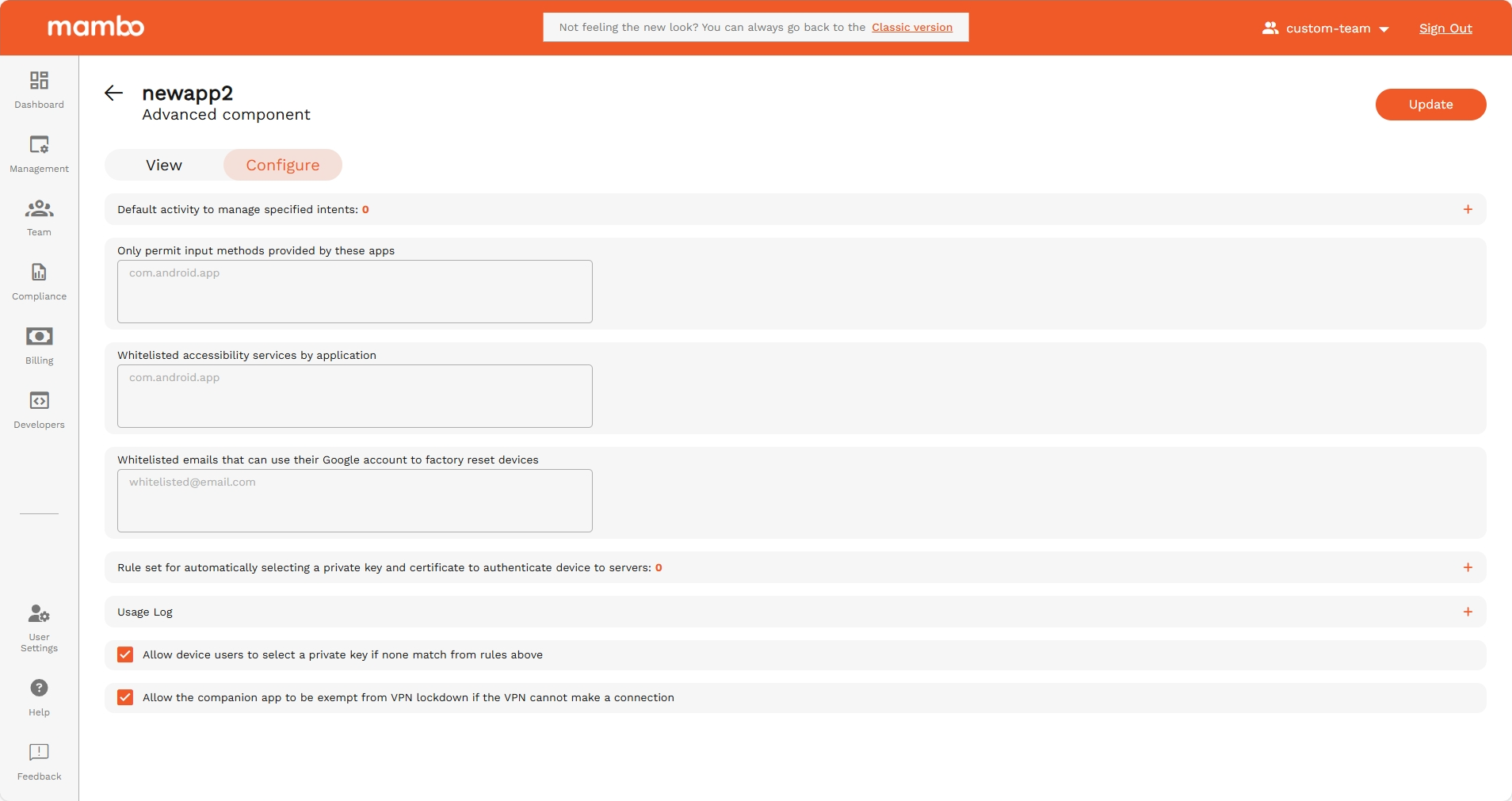
Default activity to manage specified intents
This setting defines a default app activity to automatically handle specific Android system actions (called intents), such as:
- Opening specific file types
- Handling certain links or URLs
- Managing internal system requests
Use cases:
- Force your enterprise app to handle QR scans
- Automatically open a custom browser for company URLs
- Route system actions to a specific app
This is aligned with intent filters in Android app management.
Only permit input methods provided by these apps
This setting restricts which keyboards / input methods are allowed on the device.
Why this is important:
- Prevents the use of third-party or insecure keyboards
- Eliminates risk of keystroke logging
- Ensures only approved input apps are used
Typical example: Allow only: com.google.android.inputmethod.latin or your own custom keyboard application.
This aligns with input method whitelisting in AMAPI.
Whitelisted accessibility services by application
Only the applications listed here will be allowed to use Accessibility Services.
Why this is important: Accessibility services have very powerful permissions, including:
- Reading the screen
- Performing gestures
- Monitoring other apps
Use this to:
- Explicitly allow trusted apps like a screen reader
- Block any unknown or risky accessibility-based app
This relates to:
permittedAccessibilityServicesin Android Management API
Whitelisted emails that can use their Google account to factory reset devices
You can specify email addresses that are allowed to use their Google account to unlock or reset a device after a factory reset.
This works with Factory Reset Protection (FRP).
Use cases:
- Only allow company IT admins to reset devices
- Prevent stolen devices from being reused
- Protect company-owned hardware
Rule set for automatically selecting a private key and certificate
This setting creates rules for choosing a private key + certificate pair to authenticate the device to:
- Secure Wi-Fi networks
- VPNs
- Enterprise servers
- Internal services
This is advanced certificate-based authentication.
Mapped to AMAPI concepts like:
- Managed certificates
- App cert selection rules
- Enterprise network authentication
Usage log
Enabled log types
Select which type of usage data is recorded, for example:
- App activity
- Network access
- System actions
- Security events
Use case: Helpful for:
- Auditing
- Compliance
- Forensics
- Usage reporting
Allow device users to select a private key if none match
If no rule matches, the user can manually choose a private key.
✅ Enabled — User can select
❌ Disabled — Only auto rules apply
Recommended: Disable for kiosk and highly secured devices.
Allow the companion app to be exempt from VPN lockdown
If VPN is enabled but cannot connect:
✅ When enabled – The management / companion app can still communicate
❌ When disabled – Device remains fully blocked
This is useful because:
- It prevents device lock-out if VPN fails
- Allows management recovery and updates
Summary
The Advanced Policy Component is used for:
✔ Controlling default app behaviors through intents
✔ Restricting allowed keyboards (input methods)
✔ Managing accessibility permissions
✔ Controlling factory reset permissions
✔ Managing certificates and authentication rules
✔ Fine-grained logging
✔ Ensuring management access in VPN-restricted environments
This component is ideal for:
- Banking & finance devices
- Healthcare devices
- Government / regulated environments
- Highly customized enterprise deployments
⚠ Important:
Only advanced administrators should edit these settings. Incorrect configuration may block access to the device or prevent normal operation.