
General Component
The General Policy Component allows you to change basic behavior and restrictions on managed devices. These settings control things like screen behavior, microphone access, updates, and system time.
Use this component when you want to configure how a device behaves on a daily basis.
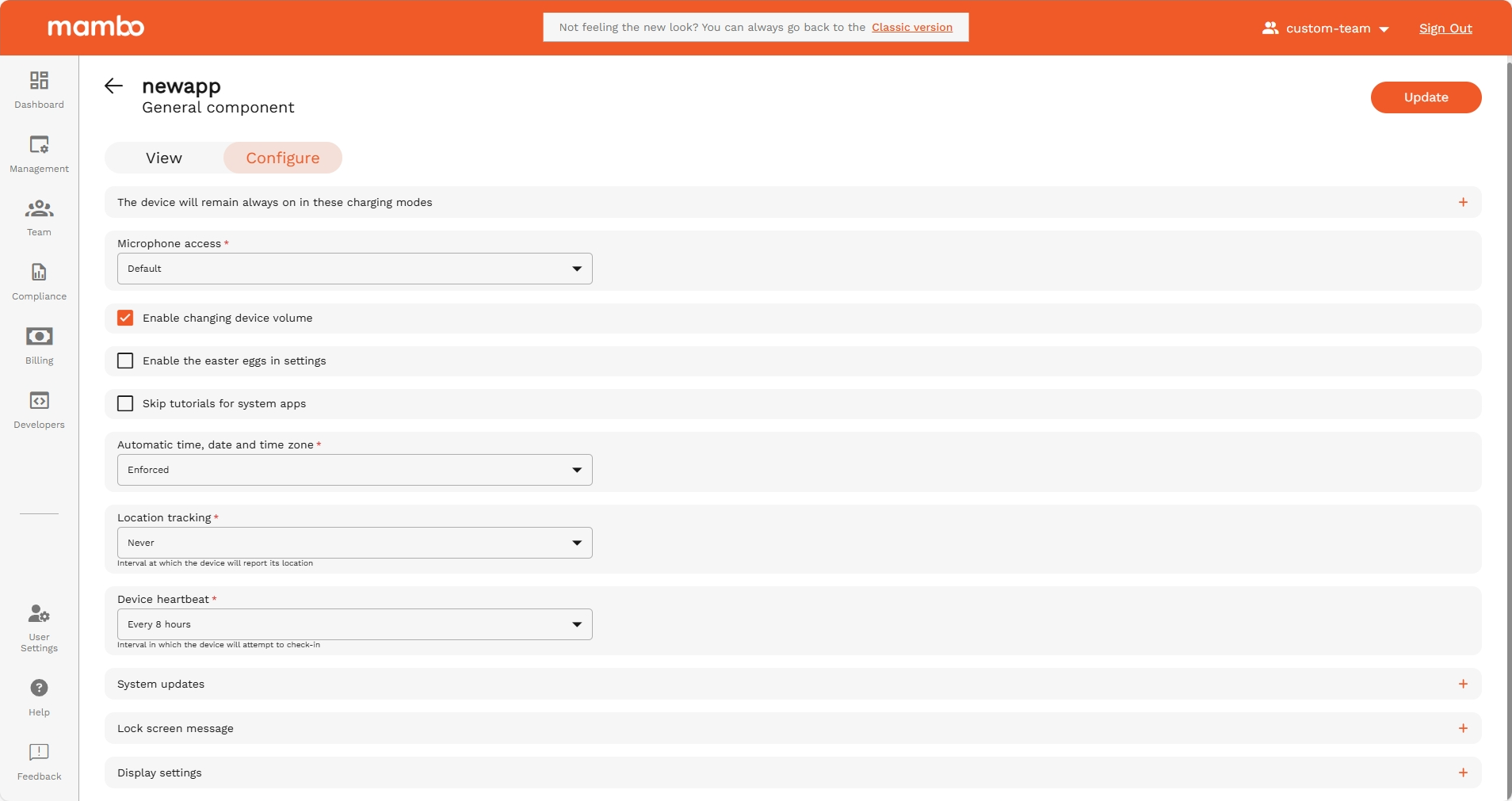
Stay on Plugged Modes
Choose when the screen should stay on while the device is charging.
Options:
- Outlet charging
- USB charging
- Wireless charging
Recommended for:
Kiosks, POS machines, and display screens that must stay active all day.
Microphone Access
Controls whether the device’s microphone can be used.
Options:
- Default – Normal access
- Blocked – No apps can use the microphone
Recommended for:
Secure environments where audio recording should be restricted.
Enable changing device volume
Choose if users can change the volume on the device.
- ✅ Enabled – User can adjust volume
- ❌ Disabled – Volume is locked
Recommended for:
Kiosk or shared devices, where volume should remain fixed.
Enable the easter egg in settings
Controls access to the Android hidden Easter Egg screen.
Recommended:
Disable for business or public-use devices.
Skip tutorials for system apps
Skips initial welcome screens and tutorials that appear when apps are first opened.
Recommended for:
Mass device deployments to save setup time.
Automatic time, date and time zone
Controls if the device sets time and time zone automatically.
- Enforced – Device sets time automatically
- Disabled – User can change it manually
Recommended:
Keep enabled to ensure correct time across all devices.
Location tracking
Defines how often the device sends its location information to the server.
Recommended for:
Organizations that need device tracking for security or logistics.
Device Heartbeat
Controls how often the device checks in with the Mambo server.
Example:
Every 8 hours
Effect:
More frequent heartbeat = faster updates and status reporting.
System Updates
Controls how the device receives software updates.
Options may include:
- Automatic updates
- Updates only during a time window
- Manual updates
Recommended:
Use a window for business devices to avoid interruption.
Lock Screen Message
Displays a custom message on the device’s lock screen.
Examples:
- Property of ACME Corp
- If found, call +1-XXX-XXX-XXXX
Recommended for:
Security and identification.
Display Settings
These settings control how the screen behaves:
- Screen Brightness – Auto or fixed brightness
- Screen Timeout – When the screen turns off after inactivity
Recommended for:
- Kiosks → High brightness + No/long timeout
- Mobile users → Auto brightness + Short timeout
Summary
Use the General Policy Component to:
✔ Control screen and power behavior
✔ Restrict microphone and user actions
✔ Manage updates and time settings
✔ Improve device security
✔ Standardize device behavior
This is one of the most important components for setting a consistent experience across all managed devices.