
Network Policy Component
The Network Policy Component allows you to control how a device connects to Wi-Fi, VPN, Bluetooth, mobile data, and other network services.
Use this component to manage connectivity, data usage, and communication features on your managed devices.
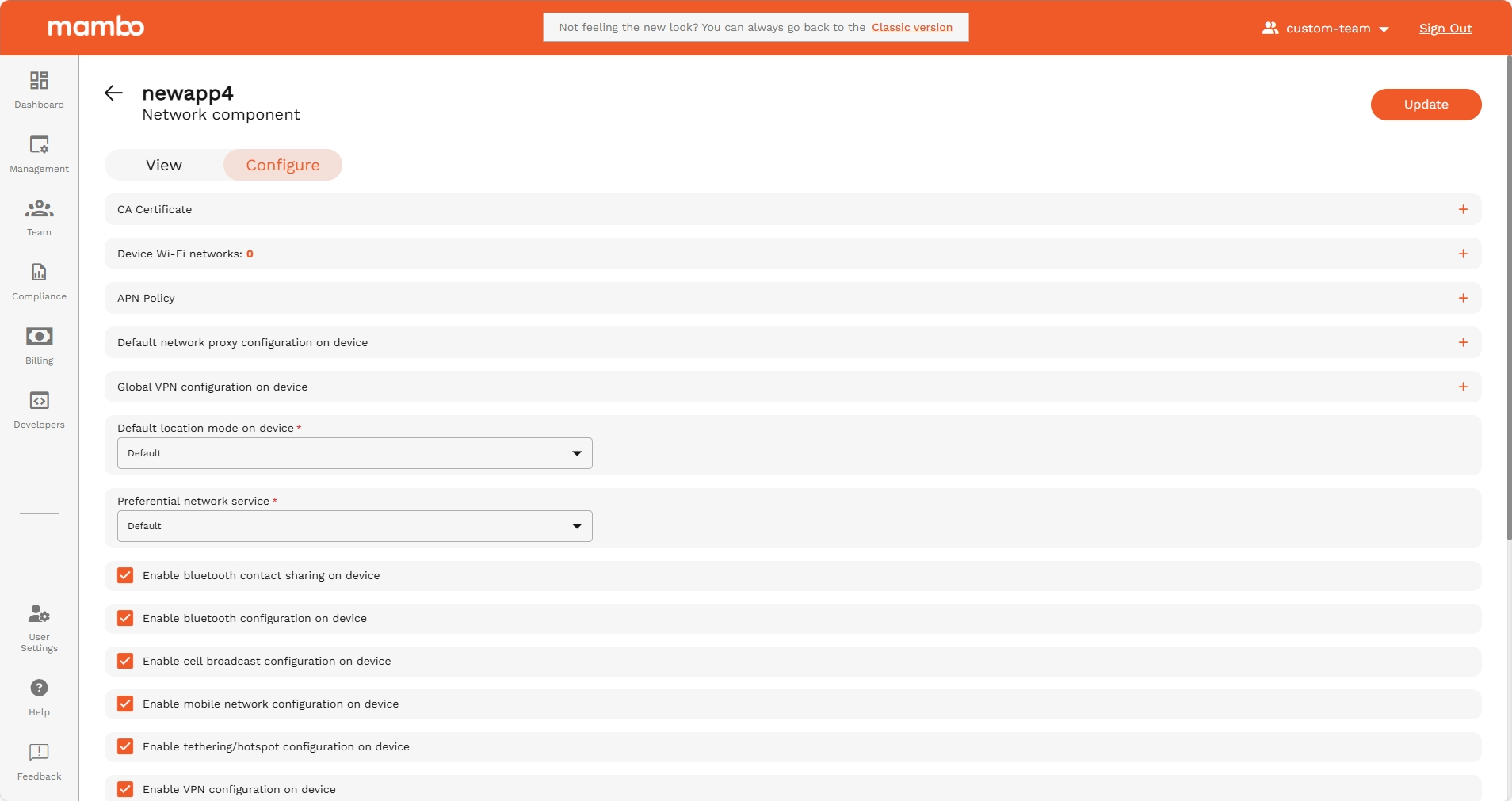
CA Certificate
Click Add Certificate to upload a trusted Certificate Authority (CA) certificate.
Use this when:
- You use secured enterprise Wi-Fi (EAP / WPA2-Enterprise)
- You use internal VPNs or private services
It helps the device trust your organization’s secure network connections.
Device Wi-Fi Networks
Click Add Network to configure a Wi-Fi network that devices can automatically connect to.
You can define:
- Network name (SSID)
- Security type (Open, WPA2, Enterprise, etc.)
- Password / Authentication method
Recommended for:
Corporate offices, warehouses, schools, or any environment where devices should auto-connect to a trusted network.
Default Network Proxy Configuration
Controls whether the device uses a proxy server to access the internet.
Options:
- None – No proxy (default)
- Manual / Auto (if configured)
Use this when:
- Internet access must go through a company proxy server
- You want to monitor or restrict web traffic
Global VPN Configuration
Allows you to configure a VPN package that routes all device traffic through a secure network.
Field:
- VPN Package (optional) – Enter the VPN app/bundle name
Option:
- Block network if VPN isn't connected
→ When enabled, the device cannot access the internet unless VPN is active
Recommended for:
High-security environments where all traffic must go through VPN.
Default Location Mode on Device
Defines how location services work on the device.
Examples:
- Default
- High accuracy
- Battery saving
This helps balance location accuracy vs battery usage.
Preferential Network Service
Sets the preferred type of network, such as:
- Wi-Fi
- Mobile network
- Default
This is useful when you want to prioritize Wi-Fi over mobile data to save costs.
Connectivity Toggles
These switches allow or block specific device features:
Recommended for:
- Disable features you do not want users to change
- Enable only what is necessary for that device’s purpose
Allow users to temporarily connect to a local Wi-Fi network
When enabled, the user can connect to a different Wi-Fi network temporarily if no managed network is available.
Once the policy is updated again, the device will revert to the company-defined networks.
Recommended:
Enable for field devices that may move between locations.
Summary
Use the Network Policy Component to:
✔ Automatically connect devices to company Wi-Fi
✔ Enforce VPN usage
✔ Control Bluetooth and mobile data
✔ Restrict tethering and hotspot use
✔ Apply proxy and certificates
✔ Control communication features
This component plays a key role in securing data and managing connectivity costs.